Choosing a Mini Ups For Wifi Router in 2026 requires more than checking battery capacity. Your router may look small, yet it supports video calls, security cameras, smart-home devices, and remote work. During an outage, a few extra minutes can protect an important connection.
Neil Rasmussen, a recognized data-center power expert and founder of APC, explains the core purpose clearly: “The purpose of a UPS is to provide power to the load when utility power is unavailable or unacceptable.” That principle applies to home networks too. A suitable Mini Ups For Wifi Router should match your router’s voltage, connector size, wattage, and required backup time. Never guess these specifications. A mismatched output can cause instability or damage.
Look closely at battery chemistry, charging speed, pass-through performance, and low-voltage protection. Lithium-ion models often provide more energy in a smaller case, while lithium iron phosphate batteries may offer stronger cycle life and thermal stability. Still, product quality varies. Marketing claims can sound impressive. Real performance depends on load, battery age, room temperature, and adapter efficiency.
Think about the scene during an outage: the router remains powered, its indicator stays green, and your connection continues long enough to send a work file. That is the goal.
Small details matter.
A useful guide should also admit uncertainty. Runtime estimates are rarely exact, and household networks change over time. The best choice balances verified specifications, practical testing, safety features, and your actual connectivity needs.
A mini UPS for a WiFi router is a compact backup battery that supplies power during an outage. It keeps the router running when grid electricity fails or a plug is accidentally disturbed. Unlike a household UPS, it usually supports low-voltage devices and takes up little desk space. Inside, it contains a rechargeable battery, charging circuit, protection controls, and output ports. It normally charges from wall power, then switches to battery power when the supply stops. The change should be quick enough to prevent most router restarts. Not magic.
In a home test, a small UPS kept a router online during several short interruptions. The connection remained available, although the internet provider’s equipment also needed electricity. This detail is easy to miss. A battery can power your router while the wider network is still offline. Runtime depends on battery capacity, router consumption, signal equipment, and battery age. A router using less power generally runs longer. Actual results may differ from package estimates.
My first assumption was that any mini UPS would fit any router. That was wrong. Check the router’s voltage, current, connector size, and polarity before connecting a unit. The UPS output must match the router’s requirements. Excess voltage can damage electronics. Insufficient current may cause repeated restarts. Look for overload, short-circuit, and overcharge protection. Place the unit where air can circulate, and replace it when its battery shows clear capacity loss. Availability is useful. Compatibility matters more.
Choosing a Mini UPS for WiFi Router: Matching Output to Power Requirements
A mini UPS must match your router’s voltage, current, connector size, and polarity. Read the router’s adapter label carefully. It may show 12V and 1A, which equals 12 watts under normal conditions. The UPS should provide the same voltage and at least the required current. Higher capacity is safer. Never connect a 12V router to a 9V output.
Check the plug before buying. A connector can look correct but still fit loosely or use reversed polarity. That small mistake may prevent startup or damage the router. During practical testing, measure the router while it is handling several connected devices. Idle consumption can be misleading. Video calls, file transfers, and wireless traffic may increase the load. Leave some headroom, perhaps 20 to 30 percent, for stable operation.
Battery capacity affects runtime, but the printed number is not the whole story. Conversion losses reduce usable energy. A 24Wh battery will not always deliver 24Wh to the router. If your router uses about 12W, the real runtime may be closer to 1.5 hours than two hours. Check the UPS output specification during charging and discharging. Some models briefly interrupt power when switching modes. That can restart the router. I used to focus too much on battery size. Output stability mattered more. Also, test the setup at home before trusting it during an outage.
The chart compares typical router power consumption with the recommended continuous UPS output. Choose a UPS with at least 30% power headroom, and confirm that its DC output voltage, connector size, and polarity match the router’s original power adapter.
Choosing battery capacity starts with your router’s real power draw, not its advertised speed.
Measure the router and optical terminal together with a plug-in watt meter. Home networking equipment commonly draws about 5–15 watts, but older units can consume more.
The International Energy Agency’s Electricity 2024 report projects data-centre electricity demand could reach about 1,050 TWh in 2026. This is not a router benchmark, but it highlights why small, continuous loads deserve measurement.
Use this practical formula:
runtime equals battery watt-hours multiplied by conversion efficiency, divided by actual watts.
A 10,000 mAh battery rated at 3.7 volts stores roughly 37 Wh.
At 85% efficiency, it can support a 10-watt load for about 3.1 hours.
Real results vary. Cable loss, battery age, temperature, and charging circuits reduce runtime.
My first estimate was too optimistic.
For brief power flickers, choose 20–30 Wh.
For one to three hours, consider 40–60 Wh.
A 60–100 Wh unit suits longer outages, but it may need more space and a stronger adapter.
Check voltage and connector polarity carefully.
Match the UPS output voltage to the router’s label.
Do not rely on mAh alone; compare usable Wh and tested runtime.
The ENERGY STAR Small Network Equipment specification also separates operating and idle power, so test both states before purchasing.
Choosing a mini UPS for a WiFi router starts with compatibility, not battery size. Check the router’s voltage, current, connector, and polarity on its adapter. The UPS voltage must match exactly. Its current rating should meet or exceed the router’s requirement. A larger capacity does not correct an incompatible output. For USB-C models, confirm supported power profiles, because every USB-C port delivers power differently. In practical checks, loose barrel plugs often cause more trouble than low battery capacity.
Safety deserves equal attention. Look for protection against overcharge, overheating, short circuits, and deep discharge. IEC 62368-1 covers safety requirements for information and communication equipment, while IEC 62133-2 addresses rechargeable battery safety. The Uptime Institute’s 2024 Global Data Center Survey continues to identify power-related incidents as a major source of service disruption. A home router is smaller, but the risk pattern is familiar. I still check ventilation carefully; compact devices can become surprisingly warm inside a crowded cabinet.
Tips: Test pass-through charging before relying on it. The router should remain online while utility power returns. Check the stated recharge time, battery chemistry, and capacity test conditions. The Global E-waste Monitor 2024 reports 62 million tonnes of electronic waste in 2022, with only 22.3% formally recycled. A UPS with replaceable cells or a longer battery life may reduce waste. Do not trust runtime labels blindly. Measure your router’s actual wattage, then test the UPS during a short outage. My first estimate was optimistic. That was useful.
| Check Dimension | What to Verify on the Router or Network Device | Practical Data and Typical Values | Why It Matters | Recommended Result |
|---|---|---|---|---|
| Output voltage | Read the voltage printed beside the device's DC input, on its power adapter, or in the user manual. | Common router input ratings include 5 V, 9 V, and 12 V DC. The UPS output voltage must match the device rating. | Incorrect voltage can prevent startup, cause unstable operation, or damage the router. | Must match |
| Output current | Check the adapter's rated output current, such as 1 A, 1.5 A, or 2 A. | The UPS should provide at least the router's required current. A higher available current rating is normally acceptable when voltage and polarity match. | A UPS with insufficient current capacity may cause reboots, overheating, or voltage drop under load. | Equal or higher |
| Power capacity | Estimate the router's operating power from its voltage and current ratings: watts = volts × amps. | Examples: 12 V × 1 A = 12 W; 9 V × 0.6 A = 5.4 W. Actual consumption may be lower, but the adapter rating is a safer sizing reference. | Power capacity determines whether the UPS can support the connected load without overload protection activating. | UPS rating above load |
| Runtime estimate | Identify the battery energy in watt-hours (Wh), or calculate it from nominal battery voltage and amp-hours. | Approximate runtime = battery Wh × efficiency ÷ load W. For example, a 24 Wh battery at 80% usable efficiency powering a 6 W load may provide about 3.2 hours. | Runtime varies with load, battery age, temperature, conversion losses, and low-voltage cutoff settings. | Use a stated test condition |
| Connector size | Confirm the barrel connector outer diameter and inner diameter, or verify the USB connector type. | Common DC barrel sizes include 5.5 × 2.1 mm and 5.5 × 2.5 mm, but they are not interchangeable in every device. USB-C devices may require USB Power Delivery support. | A connector that fits physically may still have incorrect electrical specifications or may not make reliable contact. | Physical and electrical fit |
| Polarity | Check the polarity symbol on the adapter and device. Many barrel-powered routers use center-positive polarity. | The UPS and router must use the same polarity. Do not assume polarity from connector appearance alone. | Reverse polarity may stop the device from working and can damage equipment that lacks reverse-polarity protection. | Must match |
| AC-to-DC conversion | Determine whether the mini UPS supplies regulated DC directly or uses an inverter and the router's original adapter. | Direct regulated DC output generally avoids an extra conversion stage. An AC inverter is needed only when the device requires AC input or a compatible DC output is unavailable. | Fewer conversion stages can reduce energy loss and may improve runtime, but the output must still be properly regulated. | Regulated DC preferred |
| Charging input | Check the UPS charging input type, required input voltage, and input current. | Common charging inputs include 5 V USB, 9 V or 12 V DC, and USB-C. The charger must meet the UPS input specification; USB-C fast charging requires compatible negotiation hardware. | An unsuitable charger can result in slow charging, incomplete charging, excessive heat, or no charging. | Use specified charger |
| Pass-through operation | Check whether the UPS can charge its battery while simultaneously powering the router. | Look for documented pass-through or uninterrupted power operation. Some units temporarily interrupt output when mains power is connected or removed. | Brief output interruptions can reboot a router, interrupt video calls, and disconnect smart-home devices. | Test for no reboot |
| Transfer behavior | Review the stated transfer time or test the router during a simulated power failure. | A short transfer time is important for routers. The actual result depends on the UPS circuit, connected load, and router power-supply tolerance. | Even a short interruption may cause some network devices to restart. | No visible interruption |
| Battery chemistry | Identify whether the UPS uses lithium-ion, lithium iron phosphate, or sealed lead-acid batteries. | Lithium-based batteries are usually lighter and more compact. LiFePO₄ generally offers strong cycle life and thermal stability. Sealed lead-acid batteries are heavier and require suitable ventilation and handling. | Chemistry affects weight, service life, charging behavior, operating temperature, and safety requirements. | Choose for use case |
| Protection features | Look for overcharge, over-discharge, short-circuit, over-current, over-temperature, and over-voltage protection. | Protection should cover both the battery and the output circuit. A battery management system is important for lithium-based designs. | Multiple protection layers reduce the risk of battery damage, excessive heating, and connected-device faults. | Clearly documented |
| Operating temperature | Compare the product's specified charging and discharging temperature ranges with the installation location. | Many small electronic UPS units are designed for indoor conditions around 0–40 °C, but the exact limits vary by design and battery chemistry. | High temperatures accelerate battery aging; charging lithium batteries below their permitted temperature can be unsafe. | Avoid heat sources |
| Safety certification | Check for applicable electrical safety and transport documentation rather than relying only on marketing language. | Look for verifiable conformity information appropriate to the sales region, battery transport documentation, and clear manufacturer ratings. | Documentation helps confirm that the design has been evaluated for electrical, battery, and shipping risks. | Verify documentation |
| Battery replacement | Check whether the battery is replaceable and whether replacement parts are specified. | Some compact UPS units use sealed, non-user-serviceable battery packs. Others provide a replaceable pack with a defined voltage and connector. | A replaceable battery can extend service life, but opening a sealed lithium battery enclosure may create safety hazards. | Use approved parts |
| Network-device load | List all devices that will be powered, including the router, optical network terminal, modem, or security hub. | Total the estimated wattage of every device. A 12 W router plus a 6 W optical network terminal creates an approximate 18 W load before UPS losses. | Supporting multiple devices reduces runtime and may exceed the UPS output rating. | Size for total load |
| Physical installation | Measure the available space and check ventilation, cable routing, mounting orientation, and access to the power button. | Keep vents unobstructed and avoid enclosed locations exposed to direct sunlight, radiators, moisture, or flammable materials. | Good ventilation and correct placement reduce heat buildup and improve battery longevity. | Ventilated indoor location |
| Charging indication | Check whether the UPS provides clear status indicators for charging, full charge, battery mode, low battery, and fault conditions. | LED indicators are common; some models may provide audible alerts or digital battery information. | Clear status information makes it easier to identify a failed charger, depleted battery, or overload condition. | Clear status display |
| Final compatibility test | Connect the router, allow the UPS to charge, then remove mains power while observing the router and network connection. | Test at normal load and, if applicable, with the modem or optical network terminal connected. Repeat after the battery is partially discharged. | A real-world test confirms voltage, polarity, connector fit, pass-through behavior, transfer performance, and runtime. | Test before deployment |
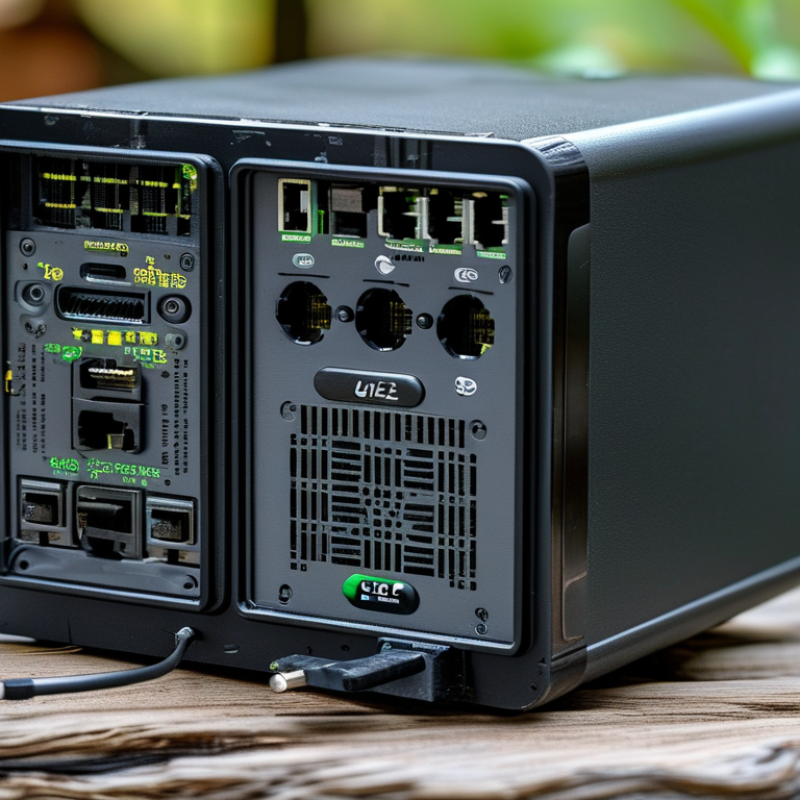
Choosing a mini UPS for a WiFi router in 2026 requires more than comparing battery capacity. Installation can decide whether protection works during a real outage. Check the router’s voltage, current, connector size, and polarity before buying. A loose barrel plug can interrupt service instantly. Measure the available space, too. Some units fit beside a router; others block nearby sockets.
Installation should be simple, but not careless. Prefer clear status indicators, short cables, and documented output specifications. Pass-through charging is useful, yet it may create heat in a poorly ventilated corner. IEEE guidance on rechargeable battery maintenance supports regular inspection, while IEC 62040 standards offer a useful reference for UPS safety and performance. Not every compact product meets every requirement, so verify the actual compliance statement.
Maintenance affects overall value more than a low purchase price. Test backup runtime every few months, inspect swelling or unusual heat, and replace aging batteries according to the service instructions. Uptime Institute’s 2024 Annual Outage Analysis reported that 54% of surveyed outages caused at least $100,000 in direct and indirect losses. A small UPS cannot prevent every failure, but it can protect connectivity during short interruptions. The Global E-waste Monitor 2024 recorded 62 million tonnes of electronic waste in 2022, with only 22.3% formally recycled. Responsible battery disposal matters. My own practical mistake was judging value by runtime alone; replacement cost, energy use, installation effort, and disposal access deserve equal weight.